





[Release] Elite Converter - Advanced DDJ/DDS ↔ PNG Conversion Tool
The user interface (UI) elements, item icons, and 3D model textures in the SRO client are compressed into the game engine's proprietary .ddj and .dds formats. To modify these graphical assets, it is mandatory to convert the files into a standard image format (PNG), edit them in graphic editors (like Photoshop), and then re-pack them back into the format the game engine can read (DDJ).
Designed specifically for EliteCommunity by Valuex, the Elite Converter is a modern tool that fully automates the graphic editing workflow with its batch processing capabilities and smart interface.
Core Features and Advantages
Interface Overview

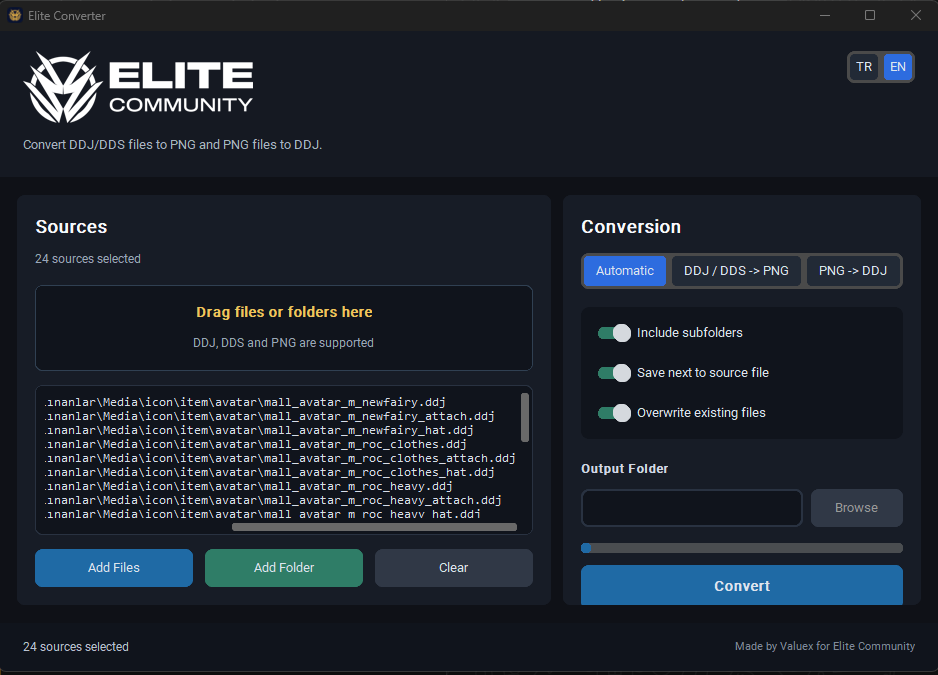
How to Use?
1. Adding Sources:
Drag the files or entire folder you want to convert into the "Drag files or folders here" area on the left side. Alternatively, you can use the "Add Files" or "Add Folder" buttons. All added files will be displayed in a list at the bottom.
2. Conversion Direction:
Select the process direction:
3. Output Configuration:
4. Execution:
Click the blue "Convert" button and wait for the progress bar to complete. Hundreds of files will be converted in seconds.
You can leave a reply under this thread for development feedback and potential bug reports.
The user interface (UI) elements, item icons, and 3D model textures in the SRO client are compressed into the game engine's proprietary .ddj and .dds formats. To modify these graphical assets, it is mandatory to convert the files into a standard image format (PNG), edit them in graphic editors (like Photoshop), and then re-pack them back into the format the game engine can read (DDJ).
Designed specifically for EliteCommunity by Valuex, the Elite Converter is a modern tool that fully automates the graphic editing workflow with its batch processing capabilities and smart interface.
Core Features and Advantages
- Convert DDJ and DDS files to PNG losslessly, or convert your prepared transparent PNG files back to DDJ format for game integration.
- When the "Automatic" option is active, the program analyzes the format of the added file and automatically converts it to the opposite format (PNG to DDJ, or DDJ to PNG).
- Batch Import: Import hundreds of files into the program simultaneously using the "Add Folder" button or the drag-and-drop method.
- When adding a folder, you can activate the subfolder option to ensure all subdirectories within the folder are also scanned and converted.
- Collect the converted files into a specific "Output Folder", or save them right next to the original files using the "Save next to source file" option.
Interface Overview
How to Use?
1. Adding Sources:
Drag the files or entire folder you want to convert into the "Drag files or folders here" area on the left side. Alternatively, you can use the "Add Files" or "Add Folder" buttons. All added files will be displayed in a list at the bottom.
2. Conversion Direction:
Select the process direction:
- Automatic: The program automatically determines the direction based on the file extension. (Ideal for mixed lists).
- DDJ / DDS -> PNG: Extracts as PNG strictly for viewing and editing purposes.
- PNG -> DDJ: Re-packs your edited files into the format readable by the game.
3. Output Configuration:
- If you want the files to be extracted next to the original, toggle the Save next to source file switch.
- Otherwise, click the Browse button to designate a specific "Output Folder" destination.
4. Execution:
Click the blue "Convert" button and wait for the progress bar to complete. Hundreds of files will be converted in seconds.
You can leave a reply under this thread for development feedback and potential bug reports.


