





If you get this error when you open Silkroad.exe:
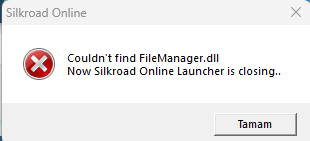
The error is caused by your antivirus program or Windows Defender deleting or blocking the GFXFileManager.dll file.
Here's what you need to do:
The error is caused by your antivirus program or Windows Defender deleting or blocking the GFXFileManager.dll file.
Here's what you need to do:

Hello Elites,
The mistake that many people make when they first download the game is not to add the game file to the virus program and windows defender exclusions. Failure to do so means that you will encounter many errors. For example; Getting disconnect or DLL error after ID-PW, nothing happening after pressing start, etc. continues with more miscellaneous errors in the form.
1) Go to Start > Settings > Update & Security > Windows Security > Virus & threat protection.
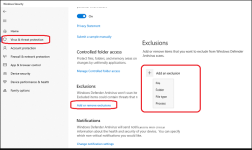
2) Select Add an exclusion, and then select your SRO...
The mistake that many people make when they first download the game is not to add the game file to the virus program and windows defender exclusions. Failure to do so means that you will encounter many errors. For example; Getting disconnect or DLL error after ID-PW, nothing happening after pressing start, etc. continues with more miscellaneous errors in the form.
1) Go to Start > Settings > Update & Security > Windows Security > Virus & threat protection.
2) Select Add an exclusion, and then select your SRO...
- Master Chief
- client not appearing after clicking start couldn't find filemanager.dll failed to execute silkroad. [error code(2)] failed to execute silkroad. [error code: (193)] failed to execute silkroad. [error code: (225)] failed to execute silkroad. [error code: (3)] failed to execute silkroad. [error code: (4556)] failed to execute silkroad. [error code: (5)] gfxmanager has stopped working how to add an exception to windows defender how to turn off windows defender silkroad antivirus silkroad c8 silkroad c9 silkroad cant start silkroad doesnt start silkroad error silkroad exclusion silkroad fix silkroad guide silkroad how to fix silkroad launcher problem silkroad missing file silkroad setup silkroad virus silkroad windows security sro client file is missing or has been blocked/deleted sro launcher doesnt start sro login problem sro security virus and threat protection in the windows security app
- Replies: 0
- Forum: SRO Issues & Errors and Fixes

