




Hello Elites,
The mistake that many people make when they first download the game is not to add the game file to the virus program and windows defender exclusions. Failure to do so means that you will encounter many errors. For example; Getting disconnect or DLL error after ID-PW, nothing happening after pressing start, etc. continues with more miscellaneous errors in the form.
1) Go to Start > Settings > Update & Security > Windows Security > Virus & threat protection.
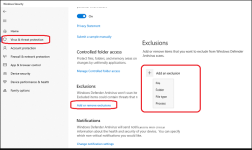
2) Select Add an exclusion, and then select your SRO folder. (A folder exclusion will apply to all subfolders within the folder as well)
3) You can move all silkroad files there and re-extract.
Have fun!
The mistake that many people make when they first download the game is not to add the game file to the virus program and windows defender exclusions. Failure to do so means that you will encounter many errors. For example; Getting disconnect or DLL error after ID-PW, nothing happening after pressing start, etc. continues with more miscellaneous errors in the form.
1) Go to Start > Settings > Update & Security > Windows Security > Virus & threat protection.
2) Select Add an exclusion, and then select your SRO folder. (A folder exclusion will apply to all subfolders within the folder as well)
3) You can move all silkroad files there and re-extract.
Have fun!
Last edited by a moderator:


